Merge duplicate contacts without losing important details
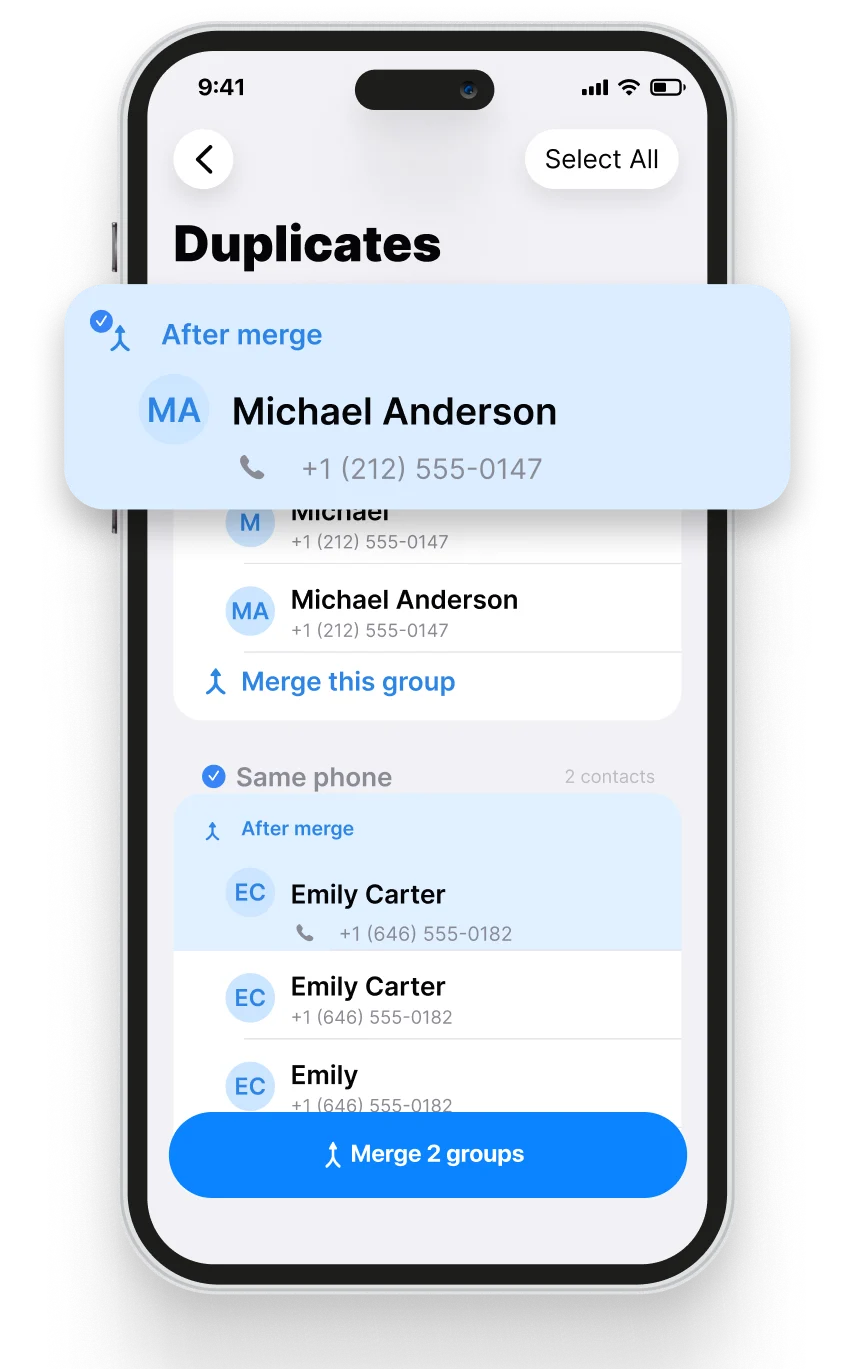
Duplicate cards often appear after syncing multiple accounts, importing an address book, or saving the same person more than once. Cleanzly groups likely matches and shows the merged result before you confirm it.
Quick answer
Use the built-in Contacts duplicate tool first when it detects obvious matches. If your address book still contains split cards, Cleanzly can group records by matching names or phone numbers and let you preview which fields will be kept.
Why duplicate contacts appear
An iPhone may show contacts from iCloud, Google, Exchange, and other accounts at the same time. The same person can exist in more than one source with slightly different names, phone formats, or email addresses.
Before merging a large number of contacts, check which accounts are enabled in Settings and make a current contact backup. This gives you a safer recovery path if an old account syncs unexpected changes.
Preview before you merge
A correct merge should preserve useful phone numbers, email addresses, company names, notes, and labels. It should not combine two different people simply because they share a first name.
Cleanzly shows the proposed result so you can inspect ambiguous matches and skip anything that does not look right.
- Compare full names instead of relying on first names alone.
- Check country codes and phone-number labels.
- Preserve work and personal email addresses when both are valid.
- Review notes and company fields before confirming.
Built-in Contacts versus a contact-cleaning workflow
Apple Contacts can surface a Duplicates Found card and merge detected records. That is the simplest option when it catches everything you need.
Cleanzly adds a focused review workflow for remaining duplicate or incomplete cards and can also help identify repeated calendar events. Use whichever tool presents the clearest preview for the records you are changing.
Common questions
Can iPhone merge duplicate contacts without an app?
Yes. Recent versions of iOS can detect and merge many duplicates in the Contacts app. A separate tool is useful when you need additional grouping and review options.
Should I back up contacts first?
Yes. Confirm that iCloud or your contact provider has completed a recent sync before making large changes.
Will contacts be uploaded to Cleanzly servers?
Core contact processing is performed on your device.
Sources and further reading
Review your storage privately
Cleanzly keeps core cleanup processing on your iPhone and lets you confirm every change.
Download on theApp Store